
Medvi Patient Portal Guide: Easy Access to Your Account and Care

Last updated: October 13, 2026
Quick Answer: The Medvi patient portal is a secure online account at app.medvi.org that gives registered Medvi patients 24/7 access to their telehealth care, GLP-1 weight-loss program, medical records, appointments, and direct messaging with licensed providers. You log in using your registered email and a six-digit one-time code, then navigate five tabs: Dashboard, Appointments, Orders, Store, and Account. [1][2]
Key Takeaways
- The Medvi patient portal lives at app.medvi.org and is accessible on any web browser, including mobile.
- Login is passwordless: you enter your email, receive a six-digit code, and enter it to access your account. [2]
- Five bottom navigation tabs cover everything: Dashboard, Appointments, Orders, Store, and Account. [3]
- You can securely message your care team, request refills, track shipments, schedule appointments, and view records, all from within the portal. [5][6]
- The portal is the primary channel for managing your GLP-1 weight-loss program, including semaglutide and tirzepatide plans. [9]
- Cancellations and billing changes require at least 72 hours’ notice before your next billing date and can be submitted through the portal chat or by email. [3]
- Full portal features are restricted to registered Medvi patients; you must create an account to access clinical services. [10]
- If the portal won’t load, clearing your browser cache, switching browsers, or using a fresh email link typically resolves the issue.
What Is the Medvi Patient Portal and How Does It Work
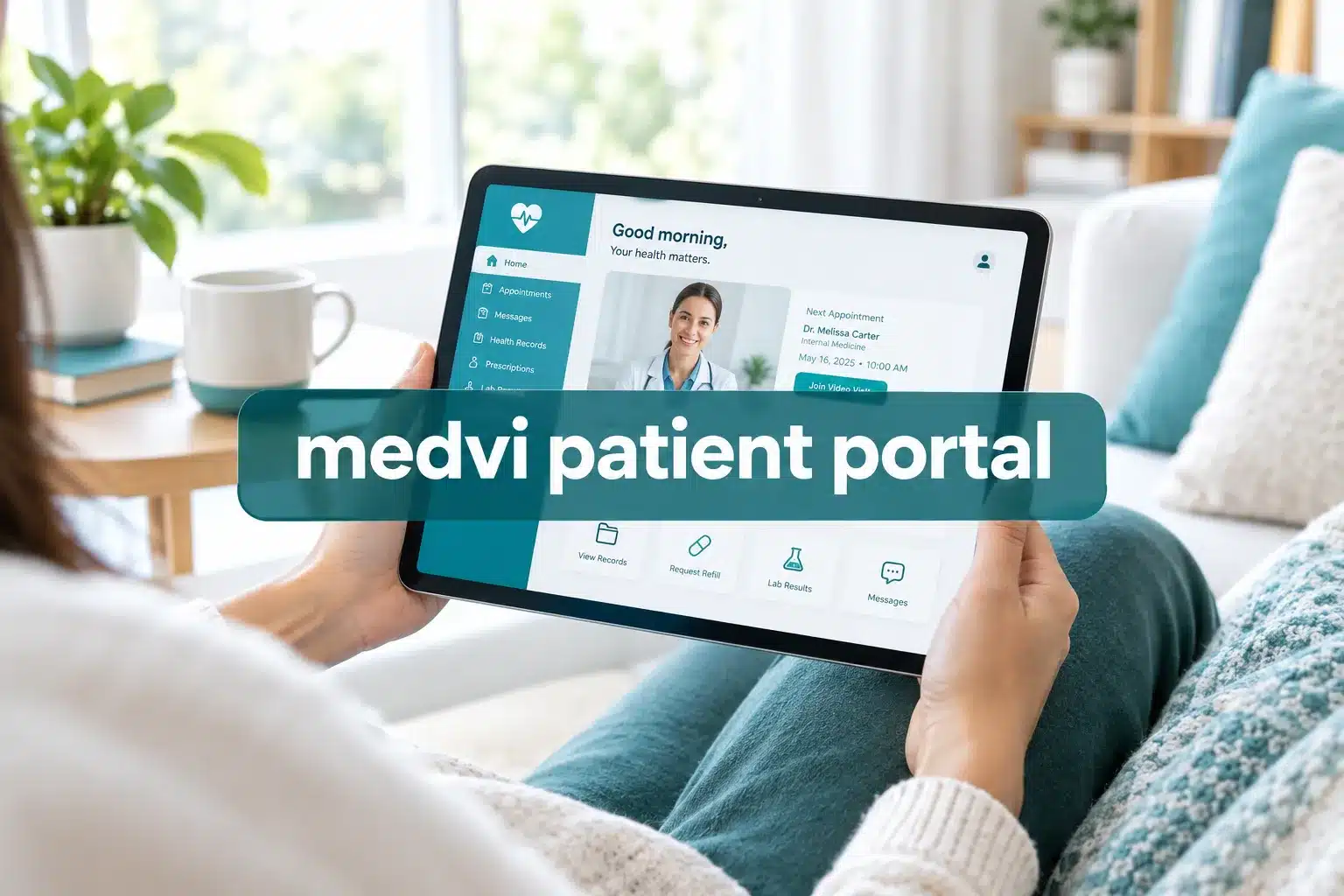
The Medvi patient portal is a secure digital platform where registered patients manage every aspect of their Medvi telehealth care. It consolidates clinical appointments, medication orders, secure provider messaging, and account management into one location, accessible around the clock. [1][6]
7 Best GLP-1 Providers Ranked: Accreditation, Flexibility & Support Compared (2026 Update)
32,000+ Patients Can't All Be Wrong: See the Top-Rated GLP-1 Providers. We compared the leading online GLP-1 providers based on program features, clinical support, convenience, and overall value.
BMI MD GLP-1 Microdosing Plan
- Specialized microdosing options, including sublingual drops and low-dose injections
- Designed for people interested in maintaining weight or gradually adjusting treatment
- Bundled program structure without a separate monthly platform membership
- Online access makes the process convenient from home

DirectMeds Weight Loss Solutions
- Online weight-loss program with a straightforward patient experience
- Compounded medication options through state-licensed compounding pharmacies
- Includes clinical consultation as part of the process
- Provides shipping updates to help patients track their orders
MEDVi Flat-Rate Telehealth
- Flat-rate telehealth approach designed for easier budgeting
- No dosage-based pricing increases within the advertised program structure
- Offers injectable and oral thin-film delivery options
- Includes medical screening and asynchronous provider consultations
Gala GLP-1 Care Program
- Text-based access to state-licensed clinicians
- Cold-chain medication shipping included in the program
- Month-to-month program structure
- Designed for people who value convenient ongoing support

Measured GLP-1 Metabolic Health
- Comprehensive metabolic health screening and intake analysis
- Designed around longer-term metabolic health management
- Responsive dashboard with integrated health tracking tools
- Useful option for patients who value a more data-focused experience
Refills GLP-1 (TryRefills Plan)
- Clinical guidance designed to help patients manage common treatment concerns
- Includes foundational nutritional strategies alongside medication
- Designed around predictable ongoing treatment
- No hidden startup or processing fees according to the program information provided
AltRx GLP-1 Transactional Reorders
- Transactional reorder model without recurring auto-billing
- Designed for patients who already understand their treatment routine
- Fast text-to-order process for convenient reorders
- Offers injectable and fast-dissolving tablet variations
Medvi positions itself as a modern telehealth provider built around GLP-1 weight-loss programs, including compounded semaglutide and tirzepatide, as well as other telehealth services. The portal is the backbone of that model. Rather than relying on occasional scheduled visits, Medvi’s care delivery depends on the portal’s real-time messaging and tracking features to keep patients connected to licensed clinicians continuously. [9]
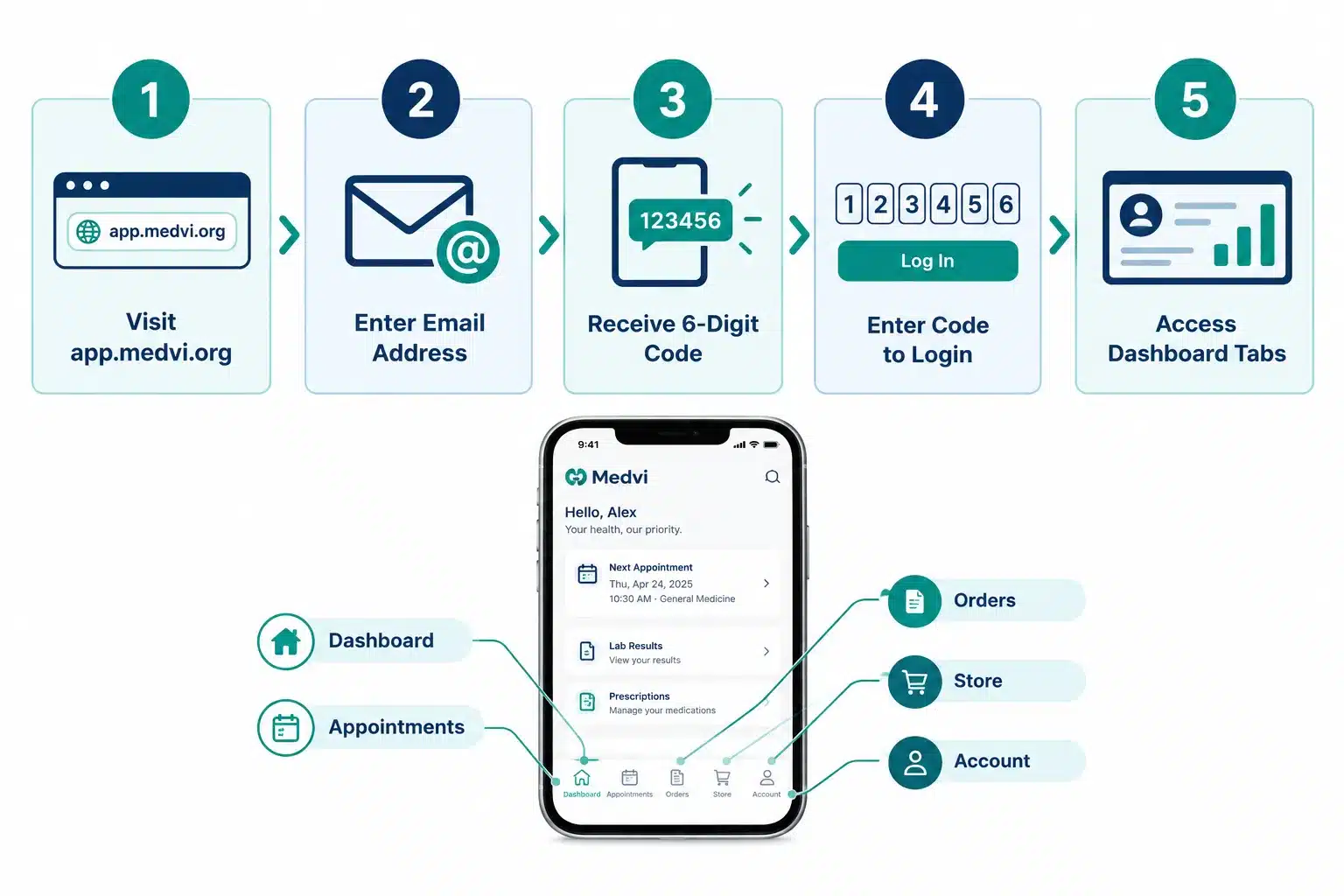
Here is how the portal works from start to finish:
- Enrollment: You complete an online intake evaluation on Medvi’s website.
- Provider review: A licensed clinician reviews your information and approves (or declines) a treatment plan.
- Portal access granted: Once approved, you receive an email to access your account at app.medvi.org.
- Ongoing care: All follow-ups, refills, shipment tracking, and clinical questions happen inside the portal.
- Subscription management: Billing, cancellations, and plan changes are also handled here or via support email. [3][5]
Medvi, LLC is a Delaware-based telehealth entity. Its platform partners with licensed medical professionals to deliver care that is, in its own words, “affordable, accessible and safe.” [1][10]
How Do I Log Into My Medvi Patient Portal Account
Logging in to the Medvi patient portal is straightforward and does not require a traditional password. You visit app.medvi.org, enter the email address tied to your account, and receive a six-digit code by email that you use to complete login. [2][3]
Step-by-step login process:
- Go to app.medvi.org in any web browser.
- Enter the email address you used when registering with Medvi.
- Check your inbox for a six-digit one-time login code.
- Enter the code on the login screen.
- You are now inside your portal dashboard.
Alternative login options include Google sign-in if your Medvi account is linked to a Google email address. [2]
Common mistake: Using the wrong email address. If you signed up with a work email but try to log in with a personal one, the code will not arrive. Always use the exact email from your original Medvi registration.
If you want a deeper look at what Medvi offers before diving into the portal, the Medvi reviews overview covers the full program experience from real users.
Can I Access the Medvi Patient Portal on My Phone
Yes. The Medvi patient portal at app.medvi.org is fully accessible through any mobile web browser on iOS or Android. You do not need to download a separate app to use the core portal features. [10]
The portal’s five-tab bottom navigation (Dashboard, Appointments, Orders, Store, Account) is designed to work within two taps on a mobile screen, making it practical for on-the-go use. [3]
Note on a dedicated mobile app: As of late 2026, it is not clearly confirmed by Medvi whether a standalone native app exists in the Apple App Store or Google Play Store. If you want the most reliable mobile experience, use your phone’s browser and navigate directly to app.medvi.org. Bookmark it for quick access.
What Can I Do in the Medvi Patient Portal
The Medvi patient portal gives you full control over your telehealth care in one place. Core functions include scheduling telehealth appointments, securely messaging your care team, viewing and managing prescriptions, requesting refills, tracking medication shipments, and reviewing your personal health records. [5][6]
Here is a breakdown by tab:
| Tab | What You Can Do |
|---|---|
| Dashboard | View program overview, progress tracking, and care team updates |
| Appointments | Schedule and manage telehealth visits with licensed providers |
| Orders | Track medication shipments and view order history |
| Store | Browse available medications and request refills |
| Account | Update personal information, manage billing, and contact support |
For patients on GLP-1 programs, the portal is where treatment instructions, dosage schedules, and progress data are all stored and updated. [8][9] If you are researching Medvi’s GLP-1 offerings, see the Medvi oral tirzepatide reviews for a detailed look at what the program delivers.
Ready to get started with Medvi’s GLP-1 program? Claim your spot and access the portal today.
How Do I Reset My Medvi Patient Portal Password
Because the Medvi portal uses passwordless login, there is no traditional password to reset. If you cannot receive your six-digit login code, the fix is to verify that you are using the correct registered email address and check your spam or junk folder. [2][3]
If you still cannot log in:
- Confirm the email address matches your original Medvi registration exactly.
- Check your spam, promotions, and junk folders for the code email.
- Request a new code by refreshing the login page and re-entering your email.
- If the issue persists, contact Medvi support at help@medvi.org with your account details. [10]
Edge case: If you registered with a Google account and used Google sign-in, use that option on the login page rather than requesting an email code.
Is the Medvi Patient Portal Secure and Private
The Medvi patient portal is a secure digital platform restricted to registered patients, meaning full clinical features require verified account access. Medvi’s terms and conditions state that actual services require registration with a username and account credentials, and the platform is operated by MEDVi, LLC under its privacy policy. [10]
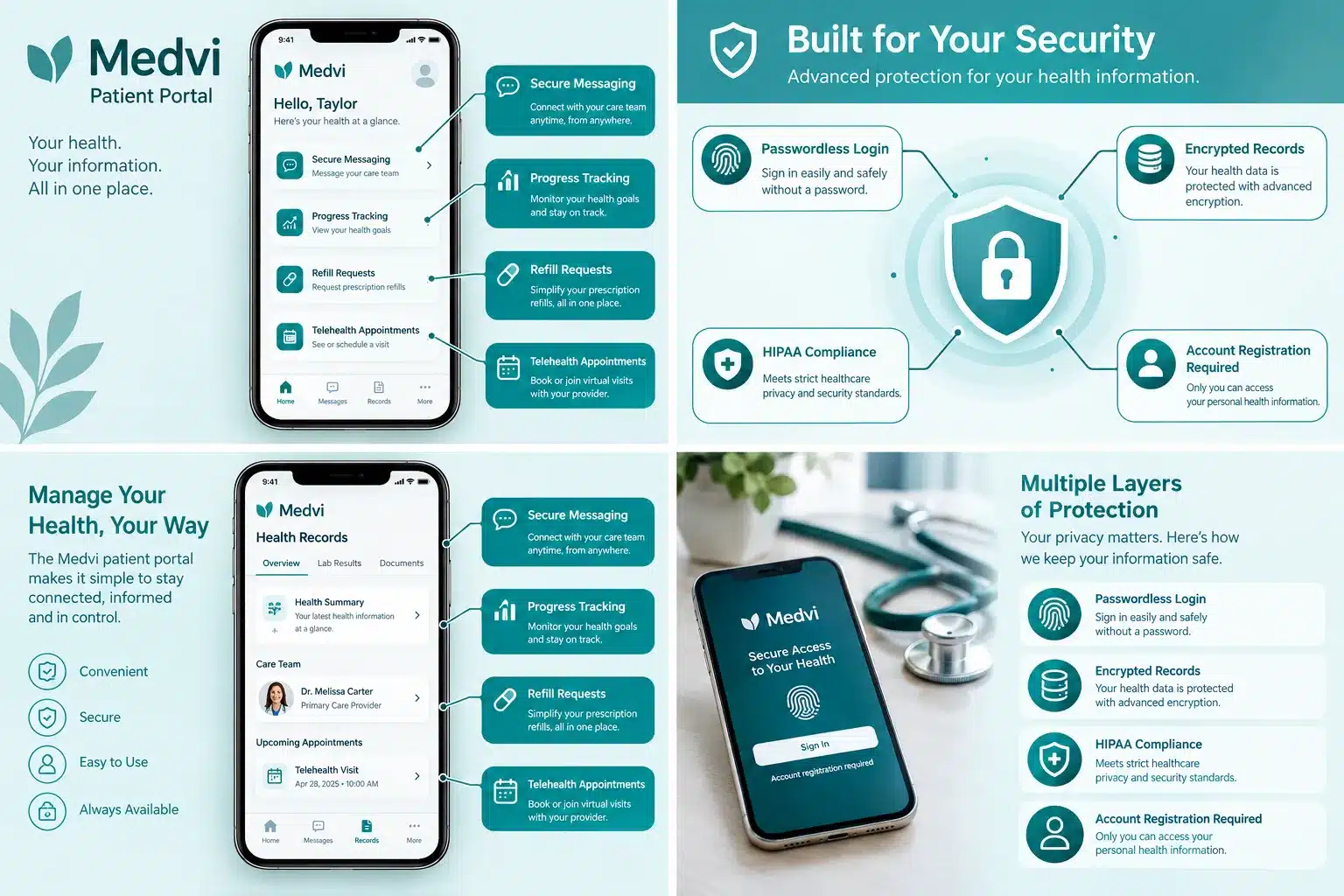
Key security features include:
- Passwordless authentication: The six-digit one-time code approach reduces the risk of stolen passwords.
- Account registration required: Public visitors cannot access clinical records or messaging.
- Secure messaging: Clinical questions about dosage, side effects, and treatment go directly to the licensed care team through the portal rather than through open email channels. [3]
- Privacy policy compliance: Medvi operates under a formal privacy policy governing how personal health information is stored and used.
Best practice: Always access the portal through official Medvi links (app.medvi.org) rather than links in unsolicited emails, to keep your health information safe. [2]
Medvi Patient Portal vs. Other Patient Portals: How It Compares
The Medvi patient portal stands out from traditional health system portals primarily because of its telehealth-first, subscription-based model focused on GLP-1 weight loss. Unlike hospital portals (such as MyChart), Medvi’s portal is built around ongoing medication management, not episodic care visits.
Key differences:
- Passwordless login: Many traditional portals still require username and password combinations. Medvi’s code-based system is simpler for most users.
- Integrated medication store: The Store tab lets you browse and request GLP-1 medications directly, something most hospital portals do not offer.
- Unlimited messaging: Medvi’s subscription model includes unlimited appointments and messaging with the care team, whereas many traditional portals limit provider communication. [9]
- Telehealth-only: Medvi does not connect to in-person clinic records, so it works best for patients whose entire care relationship is through Medvi.
Choose Medvi’s portal if you are managing a GLP-1 weight-loss program entirely through telehealth and want a simple, consolidated interface. Choose a traditional portal if you need integration with in-person lab results, specialist notes, or hospital records.
For a broader look at cost-effective GLP-1 options, the least expensive GLP-1 for weight loss guide offers useful context.
Start your Medvi GLP-1 journey through the portal today.
How Do I Upload Documents and Message My Doctor Through the Medvi Patient Portal
You can upload documents and send secure messages to your care team directly through the Medvi patient portal. The portal’s messaging function is the primary channel for clinical questions, including dosage concerns, side effects, and treatment adjustments. [3][6]
To message your care team:
- Log in at app.medvi.org.
- Navigate to the messaging or support section within your dashboard.
- Type your question or concern and submit.
- A licensed clinician or care team member will respond through the portal.
To upload documents (such as lab results or ID verification):
- Look for an upload or file attachment option within your account or appointment sections.
- Supported file types are typically PDF, JPG, and PNG.
- If you cannot find the upload function, contact support via the portal chat or at help@medvi.org for guidance. [10]
Important: Billing and subscription questions can also be handled through the portal chat, while clinical questions should always go through the secure messaging function to ensure a licensed provider sees them. [3]
What Should I Do If the Medvi Patient Portal Won’t Load
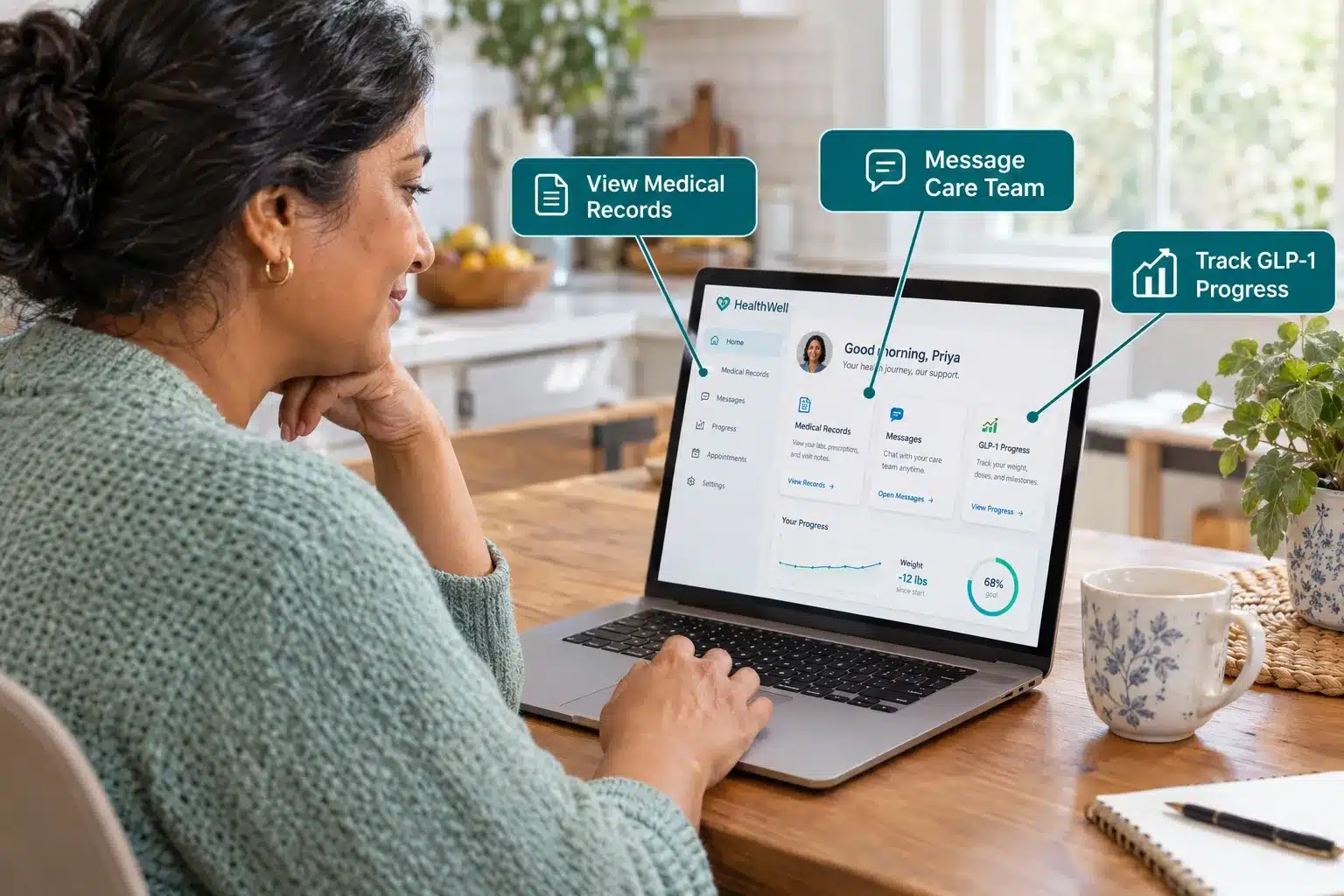
If the Medvi patient portal won’t load, the most common fixes are clearing your browser cache, switching to a different browser, or using a fresh login link from your email. Most loading issues are browser or connection related rather than a problem with the portal itself.
Troubleshooting checklist:
- Clear cache and cookies: Old cached data can prevent the portal from loading correctly.
- Try a different browser: Chrome, Firefox, Safari, and Edge all work. If one fails, try another.
- Check your internet connection: A weak or unstable connection will cause the portal to time out.
- Disable browser extensions: Ad blockers or privacy extensions occasionally interfere with portal scripts.
- Use a fresh login link: Request a new six-digit code rather than trying to reuse an old one.
- Try incognito/private mode: This bypasses most extension and cache issues instantly.
- Contact support: If none of the above works, email help@medvi.org or use the portal chat when accessible. [10][3]
Common mistake: Trying to log in from a bookmarked page that has expired. Always start from app.medvi.org directly.
Who Can Use the Medvi Patient Portal and How Long Does Access Take
The Medvi patient portal is available to adults who have registered with Medvi and been approved for a treatment program. Full portal access is restricted to eligible, registered users; you cannot access clinical features without completing the intake process and having a provider review your information. [10][1]
Who qualifies:
- Adults seeking GLP-1 weight-loss support (semaglutide, tirzepatide, and related programs).
- Patients approved for other Medvi telehealth services, including ED treatments.
- Individuals in states where Medvi’s partnered medical providers are licensed to practice.
Who may not qualify:
- Minors (under 18).
- Individuals with certain medical conditions that contraindicate GLP-1 medications (determined during the intake evaluation).
- Residents of states where Medvi does not currently operate.
How long does access take? Once you complete the online intake form and a licensed provider approves your plan, portal access is typically granted quickly, often within the same day or within 24 hours of approval. [5][7] The intake itself takes only a few minutes online.
Get approved and access your Medvi portal now.
Can I View My Medical Records on the Medvi Patient Portal
Yes. Registered Medvi patients can view their personal health information, treatment plans, prescription details, and program progress through the portal. The Dashboard and Account sections consolidate your clinical records within the Medvi system. [5][6][10]
Keep in mind that Medvi’s portal contains only the records generated within the Medvi platform. It does not pull in records from outside providers, hospitals, or other telehealth services. If you need records for an outside provider, contact Medvi support to request a formal records transfer.
For patients on GLP-1 programs, the portal stores dosage instructions, refill schedules, and progress tracking data, making it a practical ongoing reference throughout your treatment. [8][9]
If you want to understand what GLP-1 medications actually do to your body during treatment, the GLP-1 transformation guide is worth reading alongside your portal records.
7 Best GLP-1 Providers Ranked: Accreditation, Flexibility & Support Compared (2026 Update)
32,000+ Patients Can't All Be Wrong: See the Top-Rated GLP-1 Providers: Compared on accreditation, plan flexibility, and patient support — updated for 2026.
BMI MD GLP-1 Microdosing Plan
- Specialized microdosing options (sublingual drops or low-dose injections)
- Ideal for maintaining weight or tapering off higher doses safely
- Fully bundled plan with no hidden monthly platform memberships
DirectMeds Weight Loss Solutions
- Sourced from accredited, state-licensed 503A compounding pharmacies
- No-frills high-volume savings passed directly to the patient
- Includes clinical consultation and cold-chain shipping updates
MEDVi Flat-Rate Telehealth
- Flat monthly rate holds steady even at maximum maintenance doses
- No dosage upcharges or graduation fee penalties
- Offers both injectable and advanced oral thin-film delivery options
Gala GLP-1 Care Program
- All-inclusive plan with no standalone membership costs
- Continuous text-based messaging access with state-licensed clinicians
- Temperature-controlled, cold-chain medication shipping included
Measured GLP-1 Metabolic Health
- Comprehensive metabolic health screening and expert intake analysis
- Predictable long-term budgeting with stable plan pricing
- High-end responsive dashboard with integrated diagnostic support
Refills GLP-1 (TryRefills Plan)
- Flat rate holds steady as titration scales up
- Includes clinical guides for active side-effect management
- Bundles in foundational nutritional strategies alongside medication
AltRx GLP-1 Transactional Reorders
- Zero recurring auto-billing — pay entirely on a transactional basis
- Rapid text-to-order format saves time for experienced patients
- Provides both injectable forms and fast-dissolving tablet variations
Conclusion: Making the Most of Your Medvi Patient Portal Access
The Medvi patient portal is more than a login screen. For anyone on a GLP-1 weight-loss program with Medvi, it is the central hub where your care actually happens. From scheduling appointments and tracking shipments to messaging licensed providers and managing your subscription, nearly every interaction with Medvi runs through app.medvi.org. [1][5][9]
Actionable next steps:
- Register or log in at app.medvi.org using your Medvi account email.
- Explore all five tabs (Dashboard, Appointments, Orders, Store, Account) so you know where everything lives.
- Bookmark the portal on your phone’s browser for quick daily access.
- Use secure messaging for any clinical questions rather than general email, so a licensed provider sees your concern.
- Set a billing reminder at least 72 hours before your renewal date if you need to make changes or cancel.
- Review your medical records in the portal periodically to track your GLP-1 progress.
If you are still comparing Medvi to other options, the Medvi semaglutide reviews and Medvi tirzepatide monthly cost breakdown are good next reads.
Access the Medvi patient portal and start your weight-loss program today.
Frequently Asked Questions
How do I access the Medvi patient portal for the first time?
After your Medvi intake is approved, you will receive an email with a link to set up your account at app.medvi.org. Use the email address from your registration to request your six-digit login code and complete setup. [2]
What if I don’t receive the six-digit login code?
Check your spam and junk folders first. If it’s not there, confirm you’re using the exact email tied to your Medvi account, then request a new code. Contact help@medvi.org if the issue continues. [2][3]
Can I cancel my Medvi subscription through the portal?
Yes. You can submit a cancellation request through the in-portal chat function. Cancellations must be submitted at least 72 hours before your next billing date to avoid being charged. You can also email hello@medvi.org or help@medvi.org depending on your product. [3]
Is the Medvi patient portal free to use?
Accessing the portal itself is free, but the clinical services and medications available through it require an active Medvi subscription or program enrollment. [10]
Can I use the Medvi portal to manage a GLP-1 program like semaglutide or tirzepatide?
Yes. The portal is specifically designed for this. Treatment instructions, dosage schedules, refill requests, and progress tracking for GLP-1 programs are all managed through the portal. [8][9] See the Medvi tirzepatide tablets guide for program-specific details.
Does the Medvi portal work on a tablet?
Yes. Any device with a modern web browser, including tablets, can access app.medvi.org. The interface is mobile-responsive and works well on both small and large screens.
How do I contact Medvi support if I have a billing issue?
Use the in-portal chat function or email help@medvi.org. For GLP-1 program billing specifically, the portal chat is the fastest channel. [3][10]
What GLP-1 medications can I access through the Medvi portal?
Medvi’s portal supports programs including compounded semaglutide and tirzepatide. For a full review of available options and patient experiences, see the Medvi meds reviews and complaints page.
How long does it take to get portal access after signing up?
Most patients receive portal access within 24 hours of provider approval, and often the same day. The intake form itself takes only a few minutes to complete. [5][7]
Is my health data private on the Medvi portal?
Yes. Medvi operates under a formal privacy policy, and full portal features require verified account registration. Clinical messaging stays within the secure platform rather than open email. [10]
Join thousands of patients managing their weight-loss journey through the Medvi portal.
References
[1] Medvi Home – https://home.medvi.org/
[2] Medvi Patient Portal Login Guide – https://medvipatientportal.us/
[3] Medvi Review: Upsells and Renewal Price – https://www.glpwinner.com/insights/medvi-review-upsells-renewal-price
[4] Medvi – ZeroStars – https://zerostars.org/medvi/
[5] Medvi Reviews, Complaints, Side Effects, Results – https://yourhealthmagazine.net/article/reviews/medvi-reviews-complaints-side-effects-results-what-patients-reveal-in-2026/
[6] Medvi GLP-1 Review 2026 – https://yourhealthmagazine.net/article/reviews/medvi-glp-1-review-2026-is-it-effective-for-weight-loss/
[7] Medvi Expands Doctor-Led GLP-1 Weight Loss – https://www.digitaljournal.com/pr/news/vehement-media/medvi-expands-doctor-led-glp-1-weight-1757296606.html
[8] Medvi Weight Loss Landing Page – https://home.medvi.org/weightloss/whgls-lp-a1
[9] Medvi GLP-1 Program – https://glp1.medvi.org/
[10] Medvi Portal Technical Overview – https://www.plasmatx.org/medvi/
Medical Disclaimer: This article is for informational purposes only and does not constitute medical advice. Always consult a licensed healthcare provider before starting any medication or weight-loss program.
Affiliate Disclosure: This article contains affiliate links. If you click through and make a purchase, we may earn a commission at no additional cost to you.

With over 13 years of experience in holistic health blogging, I aim to help you navigate your wellness journey with honest insights, expert-backed advice, and a sprinkle of real-world practicality.
Certified Wellness Writer | Herbal Nutrition Advocate | Wellness Research Enthusiast